
The Hidden Cost of Cheap Websites

The Hidden Cost of Cheap Websites

"I've found someone who can build my website for $1,500."

It's a sentence I've heard countless times over the years.

My response is always the same.

"That's fantastic. Tell me exactly what you're getting."

Most of the time, the answer is silence.

The truth is, a website quote is a little like buying a new car. You can buy a basic model that gets you from A to B, or you can choose one with features that make the journey safer, smoother and far more enjoyable.

Neither option is wrong.

The problem is that many business owners don't realise they're buying the basic model until after they've handed over their money.

By then, every additional feature comes with another invoice.

I've seen businesses spend thousands trying to "save money" on a cheap website, only to discover it costs far more than investing in the right solution from the beginning.

The cheapest quote is rarely the cheapest solution

When you're comparing website quotes, it's natural to focus on the price.

After all, every business has a budget.

But here's what I encourage my clients to ask instead.

"What happens after my website goes live?"

That's where the real costs begin.

A website isn't a one-off purchase.

It's an ongoing business tool that needs updates, security, marketing, maintenance and continual improvement.

If none of those things are included, you'll probably end up paying for them separately.

The hidden costs nobody talks about

When I review websites for new clients, I often discover they're paying for far more than they expected.

Here's a typical example.

Service Estimated Monthly Cost
Website hosting $30 to $80
Premium plugins $20 to $100
Email marketing $40 to $300
CRM $50 to $250
Online bookings $20 to $60
Social media scheduler $25 to $80
Workflow automation $40 to $200
Form builder $20 to $60
Review management $30 to $100
Integration software $30 to $150

Suddenly, that "cheap" website is costing hundreds of dollars every month before you've even generated a lead.

Many business owners don't factor these expenses into their original budget because they weren't discussed during the sales process.

Every new feature becomes another project

One of the biggest frustrations I hear is this:

"I just wanted to add one simple thing."

Maybe it's an online booking calendar.

Maybe it's a lead magnet.

Maybe it's an automated email.

Maybe it's an online course.

Maybe it's a client portal.

Instead of simply switching on a feature, they're told they'll need another plugin, another subscription or more developer time.

A task that should take minutes suddenly becomes another project costing hundreds of dollars.

Technology should make your life easier.

Too often, it does the opposite.

Your website shouldn't rely on one person

Another issue I regularly come across is businesses that become completely dependent on their web developer.

Need to change a phone number?

Email the developer.

Need to update your pricing?

Email the developer.

Need to publish a blog?

Email the developer.

Need to add a team member?

Email the developer.

That's not a business asset.

That's a bottleneck.

I believe every business owner should feel confident making simple updates themselves without waiting days or weeks for someone else to make a five-minute change.

Software subscriptions quietly add up

One of my favourite exercises with new clients is asking them to list every piece of software they're paying for.

It usually starts like this.

"We only have a few."

Then we start writing.

Website hosting.

Email marketing.

CRM.

Booking system.

Social scheduler.

Canva.

Automation software.

SMS platform.

Calendar software.

Course platform.

Landing page builder.

Form builder.

Review software.

By the time we've finished, they're often surprised to discover they're paying for ten, fifteen or even twenty different subscriptions every month.

Many of those platforms perform similar functions.

Some are barely being used.

Others don't integrate properly.

Managing all of them becomes another full-time job.

Time is a business cost too

When people think about website costs, they usually focus on money.

I also look at time.

How many hours do you spend:

  • Logging into different systems?
  • Copying information between platforms?
  • Following up enquiries manually?
  • Sending appointment reminders?
  • Updating customer records?
  • Exporting and importing spreadsheets?

Every repetitive task steals time from serving clients, creating products or growing your business.

When those processes are automated, you don't just save money.

You gain back hours every week.

That's often the biggest return on investment.

The businesses growing fastest are simplifying

One trend I've noticed over the last few years is that successful businesses are simplifying their technology.

They're moving away from patching together lots of different platforms and instead looking for systems that work together from the beginning.

That doesn't mean every business needs exactly the same software.

It means choosing technology that supports your business instead of creating more work.

For many of my clients, that's exactly why I recommend Buzzlink.

Instead of paying for separate systems for your website, CRM, email marketing, appointment bookings, workflows, forms, sales funnels and social media scheduling, Buzzlink brings everything together in one platform.

Less complexity.

Fewer subscriptions.

Less time spent trying to make software communicate with each other.

More time spent growing your business.

Ask better questions before signing a website contract

Before you accept your next website quote, I'd encourage you to ask these questions.

  • Who owns my website?
  • Can I update it myself?
  • What ongoing monthly costs should I expect?
  • Are there additional software subscriptions?
  • Does it include a CRM?
  • Does it include email marketing?
  • Can I automate follow-up emails?
  • Can clients book appointments online?
  • Can I build landing pages?
  • Can I create sales funnels?
  • What happens if I want to expand my business in twelve months?

The answers will tell you far more than the quoted price ever will.

Invest in a business system, not just a website

A website is one of the most important investments you'll make in your business.

But it's only valuable if it helps you attract enquiries, build relationships and generate sales.

The cheapest website isn't always the most affordable option.

Likewise, the most expensive website isn't automatically the best.

The right solution is the one that supports your business today while giving you room to grow tomorrow.

I've seen businesses spend thousands fixing decisions they thought were saving them money.

I'd much rather help you choose the right path from the beginning.

If you're planning a new website or wondering whether your current setup is costing you more than it should, let's have a conversation.

I'll happily show you how Buzzlink can simplify your business, reduce unnecessary software subscriptions and bring your website, CRM, email marketing, automation and customer management together in one easy-to-use platform.

Ready to simplify your business and save money?

If you're tired of paying for multiple software subscriptions and want a platform that works as hard as you do, Buzzlink could be exactly what you're looking for.

Use my exclusive partner link below and receive $500 off your Buzzlink setup.

Why Your Website Isn’t Getting Leads

Why Your Website Isn’t Getting Leads

Have you ever looked at your website analytics and thought, "People are visiting my website, so why isn't anyone contacting me?"

It's one of the most common conversations I have with business owners.

Many people believe that once a website goes live, the enquiries will naturally start flowing in. Unfortunately, that's rarely the case. A website isn't a magic solution. It's one piece of a much bigger marketing system, and if that system isn't working together, your website can quickly become an expensive online brochure.

Over the years, I've worked with businesses that have spent anywhere from a few thousand dollars to well over $10,000 on a website. Some looked incredible. Others were packed with features. Yet many of them had one thing in common.

They weren't generating leads.

The good news is that it's usually fixable.

Your visitors don't know what to do next

When someone lands on your website, they should immediately know the next step.

Do you want them to:

  • Book a discovery call?
  • Request a quote?
  • Download a guide?
  • Purchase a product?
  • Join your mailing list?

If your call to action isn't obvious, visitors often leave without taking any action at all.

I always encourage my clients to look at every page through the eyes of a first-time visitor. If it isn't immediately clear what happens next, it's time to simplify.

You're relying on a contact form

This surprises a lot of business owners.

Most websites only offer a contact form, assuming visitors are ready to enquire straight away.

In reality, most people aren't ready to buy the first time they visit your website.

They might be researching.

They might be comparing businesses.

They might simply be curious.

If they leave without giving you their details, you've lost the opportunity to continue the conversation.

That's why I encourage businesses to offer something valuable in exchange for an email address. It could be a checklist, guide, template or resource that genuinely helps your ideal client.

Once they're on your email list, you can continue building trust long after they've left your website.

Your website isn't connected to your marketing

This is one of the biggest problems I see.

Businesses often have:

  • A website.
  • A separate CRM.
  • An email marketing platform.
  • A booking calendar.
  • Social media scheduling software.
  • Online forms.
  • Automation software.

Each platform has its own login, subscription and learning curve.

Even worse, many don't communicate properly with one another.

Instead of creating a seamless experience for customers, business owners spend their time trying to make technology work together.

Your website should be the centre of your marketing, not another disconnected tool.

You're not following up quickly enough

Research consistently shows that responding to a new enquiry quickly increases your chances of converting that lead.

Yet many businesses still rely on manually checking emails throughout the day.

Imagine someone submits an enquiry at 9.30 pm.

Do they receive an acknowledgement?

Do they receive useful information while they wait?

Do you get notified immediately?

Or does that enquiry sit untouched until the next morning?

Automation allows your business to continue working, even when you've switched off for the day.

You're measuring the wrong numbers

I often hear business owners proudly tell me their website had thousands of visitors last month.

Traffic is only one piece of the puzzle.

I'd much rather see a website with 300 visitors and 30 genuine enquiries than one with 3,000 visitors and only two leads.

The numbers I focus on include:

  • Enquiries received
  • Conversion rate
  • Phone calls
  • Booked appointments
  • Email subscribers
  • Sales generated

Those are the numbers that actually grow a business.

Your website was built and forgotten

A website shouldn't be something you launch and never touch again.

Google rewards websites that stay active and continue providing useful information.

That's one of the reasons I'm such a strong believer in blogging.

Every article you publish answers another question your ideal client is already searching for.

Over time, those articles build trust, improve your search rankings and position you as the expert in your industry.

One helpful blog today could still be bringing enquiries to your business three years from now.

Your website should be working just as hard as you are

When I sit down with a client, I don't just look at their website.

I look at the entire customer journey.

How does someone find you?

What happens after they visit your website?

How are enquiries managed?

Are they nurtured through email marketing?

Do they receive reminders?

Are follow-ups automated?

Can you see exactly where every lead came from?

When those pieces work together, your website becomes much more than a digital brochure.

It becomes one of the hardest-working members of your team.

That's exactly why I recommend an all-in-one platform like Buzzlink. Rather than paying for multiple subscriptions that don't always communicate with each other, you can manage your website, CRM, email marketing, automation, calendars, forms, social media scheduling and so much more in one place.

It saves time, reduces complexity and helps you focus on what you do best, running your business.

If you're wondering whether your current website is really working for you, I'd be happy to have a conversation.

You might discover that the problem isn't your website at all. It might simply be the systems behind it.

Ready to simplify your business?

If you're tired of juggling multiple software subscriptions and want a smarter way to manage your website, marketing and customer relationships, I'd love to show you what's possible with Buzzlink.

Sign up using my exclusive partner link and receive $500 off your Buzzlink setup.

The Legal Mistakes Small Businesses Make on Their Websites

The Legal Mistakes Small Businesses Make on Their Websites

Setting up a website? Take note! You might be making some legal mistakes that could cost your business dearly. Small businesses often overlook these crucial aspects, risking lawsuits, fines, and damaged reputations. Let’s explore the legal mistakes small businesses make on their websites.

Before you freak out, here is my amazing go-to for all legals requirements –  Legal123.com.au, you will find all you need here. I highly recommend them.

Now, let’s get to it. Here’s a jaw-dropping look at the top legal pitfalls you need to make sure you’re avoiding.

Privacy Policy? What’s That?

You won’t believe how many businesses neglect to include a privacy policy on their websites. This vital document outlines how you collect, use, and protect user data. Without it, you’re playing with fire, risking massive fines and legal battles. Don’t make this rookie mistake!

According to Legal 123 all Australian websites need a Privacy Policy.

Privacy legislation, whilst not legally required (yet), I would strongly encourage you to play it safe, especially if you’re collecting any customer or website visitor information:

  • Email addresses
  • Physical addresses
  • Telephone numbers
  • Credit card numbers, etc.

So even if you have a basic Contact Form on your website, you MUST have a Privacy Policy.

No Terms and Conditions? You’re Asking for Trouble

Are you running your website without terms and conditions? This is a ticking time bomb! T&Cs protect you from liability and set the rules for user conduct. Without them, you’re leaving your business wide open to disputes and potential lawsuits.

According to Legal 123:

“Website Terms & Conditions are a legal notice which states the terms that visitors, users and customers of your website must agree to in order to browse your website or use your products and services.

It protects you from customers claiming to have suffered loss from your content or using your products or services. It also protects you from visitors to your website copying your content, claiming damages from viruses, etc. It is intended to cover visitors, users, purchasers of your products and subscribers to your services.

Website Ts&Cs are intended for users, subscribers and customers of your website. By contrast, a Website Disclaimer is less comprehensive and just intended for general website visitors.”

Ignoring Cookie Consent: A Recipe for Disaster

If you think cookies are just a sweet treat, think again! Failing to get user consent for cookies can lead to severe penalties, especially under GDPR. Don’t get caught in this trap—implement a cookie consent banner now!

You can learn more about comply with GDPR here.

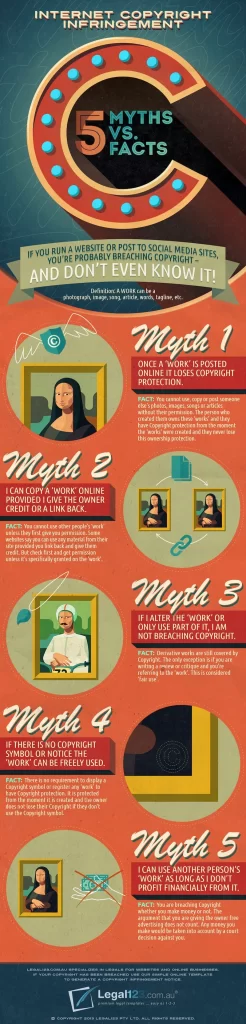
Copyright Infringement: The Silent Business Killer

Using images and content without permission? You’re flirting with copyright infringement! Many small businesses make this costly mistake. Always use properly licensed material or create your own to stay on the right side of the law.

Here is a great infographic explaining what you need to know.The Legal Mistakes Small Businesses Make on Their Websites

Source: Copyright Infringement: Myths vs Facts from Legal123.com.au

Data Security Failures: Are You Next in Line for a Breach?

Data breaches are rampant, and your business could be next. Failing to secure user data isn’t just irresponsible—it’s illegal! Implement robust security measures to protect your customers and your business from devastating consequences.

E-commerce Errors That Could Bankrupt You

Selling online? You better be compliant with e-commerce regulations! From clear pricing to transparent return policies, there are numerous rules to follow. Don’t let ignorance cost you—get your e-commerce house in order.

Email Marketing Mishaps: Are You Breaking the Law?

Think you can send marketing emails without consequences? Think again! Laws like the CAN-SPAM Act require explicit consent and an easy opt-out option. Violate these rules, and you could face hefty fines and a damaged reputation.

Outdated Policies: A Lawsuit Waiting to Happen

When was the last time you updated your website’s legal policies? Outdated policies can lead to legal troubles. Regularly review and update your policies to stay compliant and protect your business from unexpected legal challenges.

DIY Legal Documents: A Recipe for Legal Disaster

Using generic legal templates? This could be your downfall! Poorly drafted documents might not cover your specific needs, leaving you vulnerable. Invest in professional legal advice to safeguard your business from potential disputes.

Don’t let these shocking legal mistakes derail your small business! By addressing these pitfalls, you can protect your business, build trust with your customers, and focus on growth. Stay vigilant, stay compliant, and watch your business thrive.

Again, let’s not panic and just get it fixed now. I always recommend to my clients when building their website to reach out to Legal 123 for everything they need.

I do encourage you to take the time to learn about these key elements and ensure you are in compliance. And if you get stuck, reach out to Legal 123.

10 Things You Should Have On Your Website

10 Things You Should Have On Your Website

Building a website is not a cheap investment, especially for start-up businesses. Therefore it is so important that you are doing it the right way the first time. It's also important to note, that not all website designers offer all the things you need. Some may simply 'design' the look of your website. For those who already have a website built, it's important to check you do have all your bases covered.

A general website has the main menu items such as

  • Home Page - it doesn't need to be long and overflowing with words, but it should immediately allow your visitor to know what it is you offer
  • About Page - it's not entirely about you, a strategic About page will be make reference about how you backstory is beneficial to the visitor
  • Products or Services Page - whatever you're offering
  • Testimonials Page - these little babies do help sell
  • Contact Page - have a page solely designated to the contact options available for visitors. Always keep in mind how your ideal client will want to contact you. (These can also be featured in the footer to top header of your home page too)


Now for some crucial elements you should be including:

  • Back Up System - I am always surprised how many website I come across and there is NO back-up system in place. What happens if you're website is hacked, you loose everything.  I use BackUpBuddy to back up my websites, you can learn about them here. 
  • Security System - Hackers and bots are constantly on the prowl for vulnerable websites they can hack or destroy. Having a good security system will block out hacking attempts and notify you of attempts. I use iThemes Security Pro.
  • SEO - Search Engine Optimisation can feel very overwhelming for some, but Yoast SEO is a great website plugin that is user friendly. 
  • Terms and Conditions, Disclaimer and Privacy Policy - if you are an online business, which most are these day, these little gems are extremely important. Under NO circumstances should you ever copy these of another website. My go-to team is Legal123, who sell a Website Legal Package and lots more other key documents businesses should have. 
  • Mobile Friendly Theme - in today's society everyone is using mobile and always browsing the net, so it is important that your website is mobile friendly. I build my website's using Elegant Themes - Divi. They allow you to make variations on pages suitable for desktop, iPad and mobile.  


If you are looking to either build a new website, refresh or simply looking for regular maintenance, then please feel free to contact me at hello@annecclark.com and we can catch about your needs.


Please note this article does contain some affiliate links.