One of the most common headaches business owners face is what kind of content to share on social media. Or they are simply finding themselves stress because they’re putting pressure on themselves to come up with new content all the time.
Headache be gone!
When it comes to content, we fail ourselves as business owners. Why? Because we are currently spending 80% of our time creating new content, but only 20% sharing our content. We should be spending 20% creating and 80% sharing (and re-sharing) content.
Here are 5 ways you can utilise previous content you’ve created for your social media.
Previous content/posts
Keep copies of content and images from previous post and don’t be afraid to reuse them. Very rarely do people go through a business’ content from 2 years ago, therefore if it’s still relevant re-use it. Even content from 6 months ago is reusable, or last week. If you have a series of images you use for people to sign up to your mailing list, then re-use it at least once a week, and more if you’re posting more than once a day.
Blog content
Most blogs should have a call to action, which could be signing up to newsletters, booking in discovery calls, purchasing a product etc. Re-share your blogs, especially if relevant. Take snippets of the blog content or write an intro and add a call to action, such as click on the link for more, or you could share the whole blog. If you’re blog was an article of tips, just like this one, copy a tip and tell readers to click on the link for the more tips. Use different images for social media to re-share old blogs (if you’re not comfortable using the same image).
Expertise Categories
In business, we all have niche areas, and under our niches are categories we specialise in. For example: in my coaching business, I am a coach who specialises in intuition, alignment, boundaries, balance and boundaries. Therefore, I would share content around those 5 areas. As a virtual assistant, I specialise in social media, newsletters, blogging, productivity/systems and online management. Again, I would share expertise content around these areas.
Testimonials / Feedback
Feedback sells, often when someone is searching for a new product or service, they check out what others have said about it. You might have testimonials on your website, in emails or have had awesome comments on your social media platform, use these to share with your audience. Feedback on your service are big sellers.
Hints of things to come
Entice your audience with some of the projects you’re working on, or perhaps the blog you’re writing about this week. Tease them with what is to come. Perhaps if you’re making a new product take a snippet image of it and ask them what they think it is.
It is okay to share and re-share your content. Don’t be afraid to do so.
If you’re making a branded quote for the week’s content, then why not make a whole heap of them for the next couple of weeks or months and save yourself time and effort. This is BULK acting.
Don’t be afraid to pre-plan your content, and then if additional items come up add them in. By pre-planning and scheduling your content it enables you not to feel so panicked that you haven’t posted anything or having come up with content.
If you’re struggling to create the time to manage your social media, then let’s chat about how I can help you manage this. Contact me today.
Creating Facebook lives or videos in a private Facebook group, however you want to repurpose it for elsewhere. Here are some instructions on how to download videos from closed Facebook groups.
To do this, you need to use Google Chrome.
1. Open up your video in your Facebook group.
2. Click to open the video to the full page view.
3. Right click on the video to show the video URL.
4. Copy the URL.
5. Paste the URL into a new browser address bar, and replace the ‘www’ with ‘m’.
6. The page will reload.
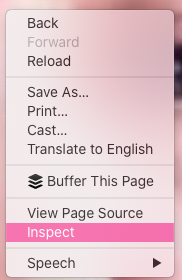
7. Click the right mouse button and click on Inspect
8. A windowpane will appear the bottom of your screen
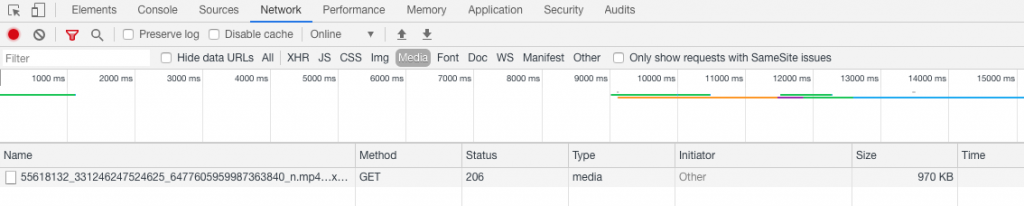
9. Click on the Network tab
10. Click on the sub tab Media
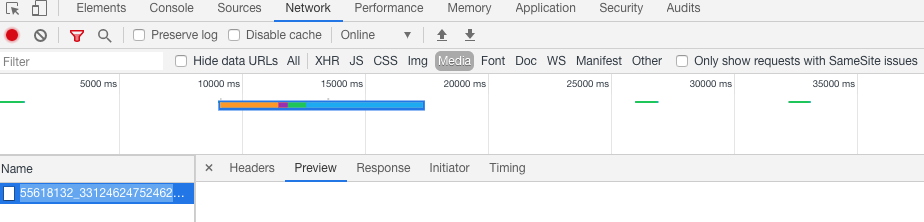
11. The start playing the video and you will see the name appear in the bottom section of the window pane
12. Double click on the video name and it will open into a new browser page
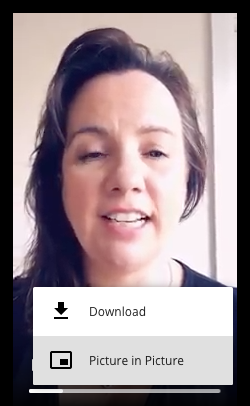
Click on the 3 dots and click download.
Now you can repurpose and reuse your video elsewhere.
WANT TO KNOW MORE?
Join my mailing list and learn how to start outsourcing, automation and systemising your business. I send regular newsletters with the latest things to know in the digital space for your business.
Coming up with content for your social media can feel frustrating, but here are 5 content sources you can utilise to build your social media content.
One of the biggest failing you do in business is spending more time creating than sharing. You should be spending 20% creating and 80% sharing (and re-sharing) content. This is what all the great digital marketers and entrepreneurs are constantly saying.
Here are 5 ways you can utilise previous content you’ve created for your social media.
Previous content/posts
Keep copies of content and images from previous post and don’t be afraid to reuse them. Very rarely do people go through a business’ content from 2 years ago, therefore if it’s still relevant re-use it. Even content from 6 months ago is reusable, or last week. If you have a series of images you use for people to sign up to your mailing list, then re-use it at least once a week, and more if you’re posting more than once a day.
Blog content
Most blogs should have a call to action, which could be signing up to newsletters, booking in discovery calls, purchasing a product etc. Re-share your blogs, if relevant. Take snippets of the blog content or write an intro and add a call to action, such as click on the link for more, or you could share the whole blog. If you’re blog was an article of tips, just like this one, copy a tip and tell readers to click on the link for the more tips. Use different images for social media to re-share old blogs (if you’re not comfortable using the same image).
Expertise Categories
In business, we all have niche areas, and under our niches are categories we specialise in. For example: in my coaching business, I am a coach who specialises in intuition, alignment, boundaries, balance and boundaries. Therefore, I would share content around those 5 areas. As a project manager, I specialise in social media, newsletters, blogging, productivity/systems and online management. Again, I would share expertise content around these areas.
Testimonials / Feedback
Feedback sells, often when someone is searching for a new product or service, they check out what others have said about it. You might have testimonials on your website, in emails or have had awesome comments on your social media platform, use these to share with your audience. Feedback on your service are big sellers.
Hints of things to come
Entice your audience with some of the projects you’re working on, or perhaps the blog you’re writing about this week. Tease them with what is to come. Perhaps if you’re making a new product take a snippet image of it and ask them what they think it is.
It is okay to share and re-share your content. Don’t be afraid to do so.
If you’re making a branded quote for the week’s content, then why not make a whole heap of them for the next couple of weeks or months and save yourself time and effort. This is BULK acting.
Don’t be afraid to pre-plan your content, and then if additional items come up add them in. By pre-planning and scheduling your content it enables you not to feel so panicked that you haven’t posted anything or having come up with content.
If you’re struggling to create the time to manage your social media, then let’s chat about how I can help you manage this. Contact me today.
This website uses cookies to improve your experience. We'll assume you're ok with this, but you can opt-out if you wish. Cookie settingsACCEPT
Privacy & Cookies Policy
Privacy Overview
This website uses cookies to improve your experience while you navigate through the website. Out of these cookies, the cookies that are categorized as necessary are stored on your browser as they are essential for the working of basic functionalities of the website. We also use third-party cookies that help us analyze and understand how you use this website. These cookies will be stored in your browser only with your consent. You also have the option to opt-out of these cookies. But opting out of some of these cookies may have an effect on your browsing experience.
Necessary cookies are absolutely essential for the website to function properly. This category only includes cookies that ensures basic functionalities and security features of the website. These cookies do not store any personal information.
Any cookies that may not be particularly necessary for the website to function and is used specifically to collect user personal data via analytics, ads, other embedded contents are termed as non-necessary cookies. It is mandatory to procure user consent prior to running these cookies on your website.